Claude turns chat artifacts into desktop apps with file access
An artifact in Claude is a mini-program that the model builds right in the chat. Now it can be installed as a desktop app for Windows and Mac. It gets its own window, an icon and notifications, and the author gets access to the computer's files, for example to sort through a folder of documents. Everything runs only inside Claude Desktop, so the feature suits personal and team utilities, but not shipping a product to the outside world.
AI-processed from TG: @ai_product (AI Product / Igor Akimov); edited by Hamidun News
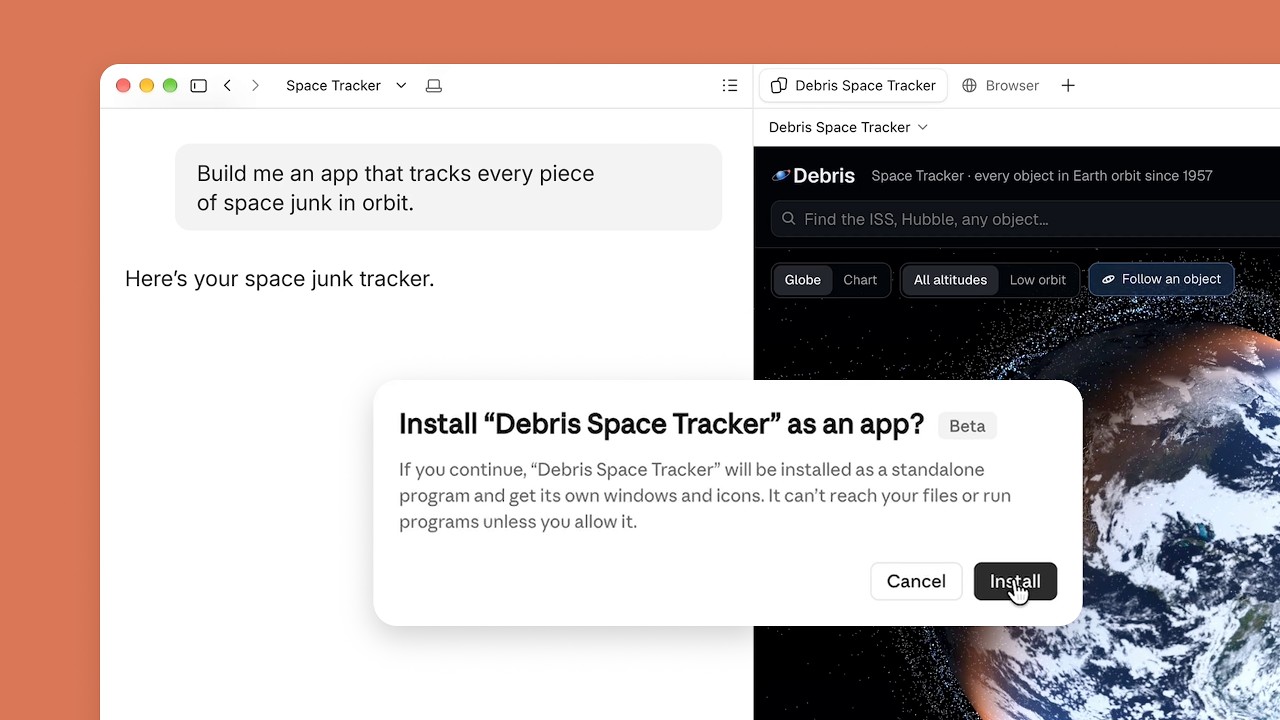
Imagine you asked Claude to write a utility that sorts through a folder of a hundred documents, and it built the program right in the chat. Such a mini-program is called an artifact. Previously it lived only inside the conversation, and to use it as regular software you needed hosting, deployment and all the related hassle. Now the path is shorter: an artifact can be installed as a desktop app for Windows and Mac, that is, as an ordinary program with its own window and icon. For the author, such an app also gets access to the computer's files: it can run programs, read, modify and delete files.
Igor Akimov broke down the feature in detail in the AI Product channel, and the conditions are described in Anthropic's help center. Let's look at what it actually does and where the catch is.
How it works in practice
The artifact menu now has an "Install as app" option. You click it, confirm the installation, and the app launches like any other program: it has its own window and icon. It can send notifications, respond to keyboard shortcuts and stay on top of other windows. If you later edit the artifact in Claude, the app updates along with it. You don't need to reinstall anything.
The main difference from a regular artifact is computer access. For the author, the app can run programs and work with files without asking for confirmation for each action. This enables real scenarios: a utility that sorts everything on a disk into folders, or a processor for all documents in a chosen directory. The downside is obvious: a tool allowed to delete files without confirmation should first be tested on a sample folder, and only then be given access to working data.
Limitations you should know
Running it requires Claude Desktop, and the free plan is enough. Only Windows and Mac are supported for now. Not every artifact can become an app: for example, documents built from templates such as docs cannot be installed. Without internet and a Claude account sign-in, the app will not open, and its operation consumes your plan's limits. In other words, this is not a standalone program but a shell around Claude.
How sharing and permissions work
You can share the app with anyone who has access to the artifact and has Claude Desktop installed. The recipient installs the app on their own machine, and updates arrive automatically. If the author stops sharing, the recipient's app stops working.
The permissions are the subtle part. On personal plans, full computer access exists only for the author. For everyone else, the app works at browser level, plus notifications and keyboard shortcuts. Full access for recipients is possible only on Team and Enterprise plans, only for apps created within the organization, and only if an administrator has enabled this option. For companies this makes sense: the admin decides which custom tools may touch employees' files at all.
Who will benefit
The practical takeaway: the feature is good for personal utilities and internal team tools. A product manager can build a report processor for themselves in an evening, and a team can build a shared document sorter without involving developers or setting up infrastructure. For anyone who wants to ship software to the outside world, it is not suitable: recipients are tied to Claude Desktop and a Claude account, and their permissions are limited.
The reviewer notes that the most valuable change would be decoupling apps from Claude and letting them run through the API. For now that option does not exist, and it is precisely the tie to Claude that makes the feature an internal tool rather than a way to distribute programs. If you work in Claude Desktop all day, it's worth trying. If you need a standalone product, you will still have to deal with deployment.
- Nov 26, 2026Z.AI and Moonshot Push GLM-5.5 and Kimi K4 to 2027 as Chips and Data Get Locked Down
- Nov 26, 2026Warp taught its AI reviewer to learn from human replies: instruction fixes arrive as PRs
- Nov 26, 2026Anthropic Teaches MCP Servers to Serve Skills Directly to Claude Code
- Nov 26, 2026Startups Are Getting Tokens Instead of Cash: Dialogus Raised $500K and Received $3M in Credits
Key Questions Answered
How it works in practice?
The artifact menu now has an "Install as app" option. You click it, confirm the installation, and the app launches like any other program: it has its own window and icon. It can send notifications, respond to keyboard shortcuts and stay on top of other windows. If you later edit the artifact in Claude, the app updates along with it. You don't need to reinstall anything. The main difference from a regular artifact is computer access.
What are the key details on Limitations you should know?
Running it requires Claude Desktop, and the free plan is enough. Only Windows and Mac are supported for now. Not every artifact can become an app: for example, documents built from templates such as docs cannot be installed. Without internet and a Claude account sign-in, the app will not open, and its operation consumes your plan's limits. In other words, this is not a standalone program but a shell around Claude.
How sharing and permissions work?
You can share the app with anyone who has access to the artifact and has Claude Desktop installed. The recipient installs the app on their own machine, and updates arrive automatically. If the author stops sharing, the recipient's app stops working. The permissions are the subtle part. On personal plans, full computer access exists only for the author. For everyone else, the app works at browser level, plus notifications and keyboard shortcuts.
Test Frontier LLMs & Autonomous Agents in One Workspace
Run Claude Opus 5.5, GPT-6, Gemini 3.1, and DeepSeek side-by-side in Nomad AI (nomadnet.ai) — unified model routing, deep research, and multimodal workflows under one subscription.
Daily 60-sec AI Voice Brief + Weekly Production AI Agent Playbook
Listen to a 60-second AI news brief every morning and get a weekly hands-on playbook for shipping AI agents to production — tools, MCP servers and patterns that work. Curated by Jemal Hamidun, Head of AI at Alpina Digital.
