Animating a 19th-Century Painting Layer by Layer: 4–5 Failed Clips for Every Good One
Hand a video model the whole painting, and it will redraw the faces, the uniforms and the bridge. So the author split Lawrence Alma-Tadema's painting of the crossing of the Berezina into layers in Photoshop, animated the figures one by one in MiniMax H3, and assembled the scene in After Effects. The price of control is time: each usable clip took 4–5 failed attempts. For complex scenes, it pays to split the task and check every piece.
AI-processed from Habr AI; edited by Hamidun News
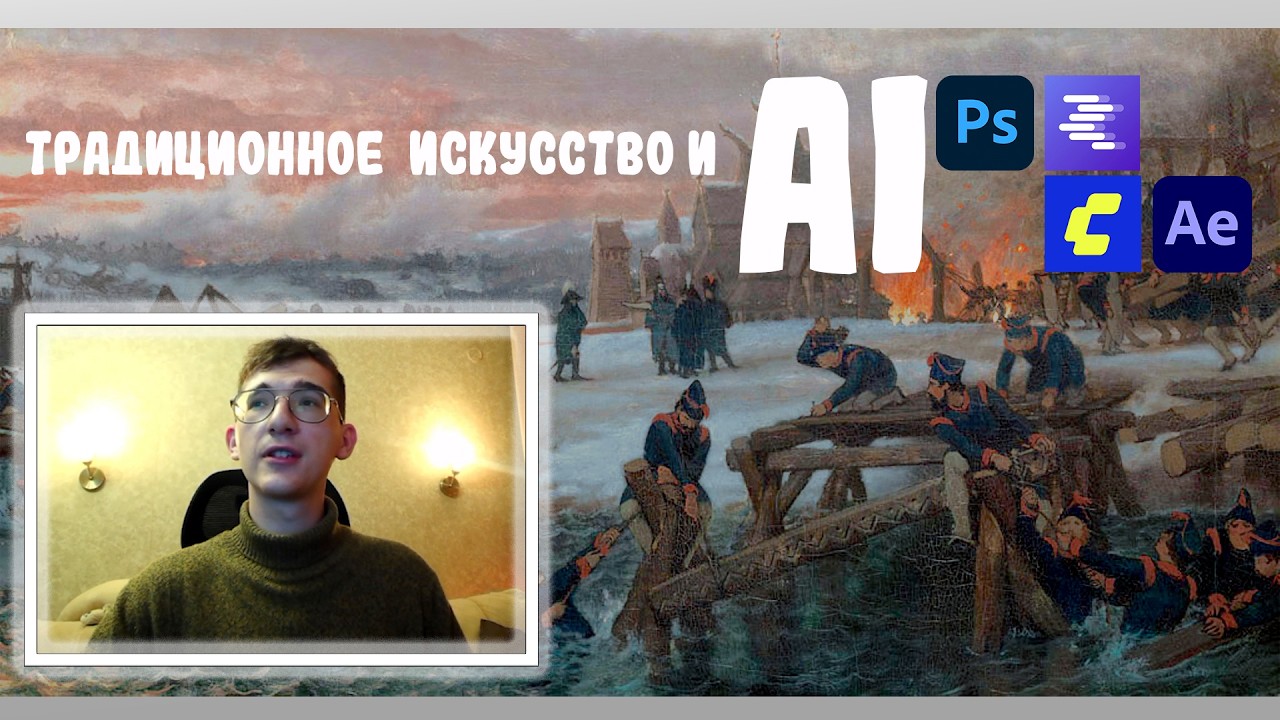
Video generators have learned to move images beautifully, but give them a complex scene with dozens of people and they start improvising: they change faces, uniforms, architecture and even the number of hands. Imagine asking a model to animate a historical painting, only to find a soldier's coat swapped for different clothing and a bridge being built in the opposite direction. The author, Dmitrii (the Dmitrii DAK channel) on Habr, worked around this problem using Lawrence Alma-Tadema's painting "Anno 1812.
Kapitein Benthien aan de Beresina", which shows Dutch pontoniers building a crossing over the Berezina during Napoleon's retreat. Instead of a single "animate everything" request, he split the work into small, manageable pieces. The price of this control is time: by his observation, each usable clip took 4–5 failed or "almost" successful generations.
This is the experience of one process, not universal statistics, but it clearly shows where the effort actually goes.
Layers first, motion second
The first stage happens in Photoshop. The author selects characters and objects, moves each onto a separate layer, and groups the layers by meaning: water, people, structures. The key rule is that fragments keep the original canvas coordinate system, without cropping to the minimal rectangle. This way, the layers line up in After Effects without manual adjustment of scale and position.
Next comes the problem of holes. If you remove a soldier, there should be planks, another man's shoulder and snow behind him. These areas are filled in with inpainting (neural-network background reconstruction) so that color, light, brushstroke direction and perspective match. On a still image the seam can go unnoticed, but in motion the background starts to "slide" relative to the figure, so the author checks the joins especially carefully.
A separate step concerns faces. In the painting many figures are small, and in animation a "smeared" face gives away the substitution. The characters are run through detail enhancement with the condition that pose, proportions and painterly character stay unchanged. At the same time, the background behind them is replaced with green, which is later removed in compositing with an eyedropper, because other animated characters stand behind them.
A local LLM writes the prompts, MiniMax H3 moves the fragments
To avoid writing long descriptions by hand, the author runs a local multimodal model, Qwen 3.8 27B in the Q5_K_XL quantization (a compressed version that fits in video memory), in LM Studio. It receives three things: a basic description of the desired motion, the painting fragment itself, and a list of constraints (clothing, appearance, neighbors' positions, fixed camera). The model looks at the image and outputs a detailed English prompt. For example: eight soldiers in dark uniforms walk left to right along a snowy bank carrying logs, static camera, medium shot at 35 mm, canvas texture.
The video is generated in ComfyUI on the MiniMax H3 video model. To speed things up, the author uses a 10-step LoRA (a small add-on that allows faster computation), SageAttention and the Spectrum node. Close-up shots were rendered at 1.8 megapixels (1824×1024), and the other shots at 0.3 megapixels (736×416).
Results are judged not by whether they look beautiful, but by their suitability for editing:
- whether the original pose is preserved;
- whether the number of objects and limbs has changed;
- whether one character's hand or leg passes through another;
- whether the motion matches the physics of the environment.
It is by these criteria that the familiar 4–5 failed attempts per successful one accumulate. The scene with the officers and logs had to be rebuilt more than 15 times: an officer walked through a soldier repairing the bridge. People standing waist-deep in icy water, pushing logs and holding onto each other, came out worse than the figures on the bank.
Assembly in After Effects and the cost of the experiment
In After Effects, the layers and generated clips are placed according to their original coordinates. To separate figures from the background, the author uses Roto Brush: he checks mask stability, corrects edges, and looks separately at clothing, hands and legs, where errors are most visible. Finally, he matches color and light so the fragments don't stand out from the overall painting.
The work was done on a workstation with an Intel Core i9-14900K and an NVIDIA GeForce RTX 5090 with 32 GB of video memory, entirely locally. The author stresses that this graphics card is not required: the stages can be run on weaker hardware, lighter model versions can be used, or generation can be moved to the cloud. In that case, the resolution, speed and set of available models would change.
What this means in practice
The article describes one author's experience, not a reproducible benchmark, and that is its main limitation. But the conclusion applies more broadly. The more complex the scene, the more it pays to split it into independent pieces and keep a human in the loop checking each step.
The length of the final video is a poor indicator of the effort involved: a few seconds of animation can cost dozens of generations and manual rework. If you run this in the cloud, the cost is measured in tokens or credits, and the budget should allow a margin of 4–5 attempts per fragment. For museum installations, exhibitions and educational projects, this kind of pipeline delivers what a single request to a video model cannot: the original composition preserved.
- Nov 21, 2026Waymo pulls robotaxis off highways after new entries into work zones
- Nov 21, 2026AG-UI 1.0 gives AI agents a common language for talking to apps: 31 event types
- Nov 21, 2026GPT Image 2 and Gemini Omni 1.2 Flash Animated 15 Pixel-Art Game Assets
- Nov 21, 2026AURA 2.0 Video Model Starts Talking on Its Own: Response Audio Arrives in 344 ms
Key Questions Answered
What are the key details on Layers first, motion second?
The first stage happens in Photoshop. The author selects characters and objects, moves each onto a separate layer, and groups the layers by meaning: water, people, structures. The key rule is that fragments keep the original canvas coordinate system, without cropping to the minimal rectangle. This way, the layers line up in After Effects without manual adjustment of scale and position. Next comes the problem of holes. If you remove a soldier, there should be planks, another man's shoulder and snow behind him.
What are the key details on A local LLM writes the prompts, MiniMax H3 moves the fragments?
To avoid writing long descriptions by hand, the author runs a local multimodal model, Qwen 3.8 27B in the Q5_K_XL quantization (a compressed version that fits in video memory), in LM Studio. It receives three things: a basic description of the desired motion, the painting fragment itself, and a list of constraints (clothing, appearance, neighbors' positions, fixed camera). The model looks at the image and outputs a detailed English prompt.
What are the key details on Assembly in After Effects and the cost of the experiment?
In After Effects, the layers and generated clips are placed according to their original coordinates. To separate figures from the background, the author uses Roto Brush: he checks mask stability, corrects edges, and looks separately at clothing, hands and legs, where errors are most visible. Finally, he matches color and light so the fragments don't stand out from the overall painting.
Test Frontier LLMs & Autonomous Agents in One Workspace
Run Claude Opus 5.5, GPT-6, Gemini 3.1, and DeepSeek side-by-side in Nomad AI (nomadnet.ai) — unified model routing, deep research, and multimodal workflows under one subscription.
The AI world, distilled — once a week
Seven stories that actually mattered, hand-picked. No noise, no reposts, no press releases.
Done! Check your inbox for a confirmation.