Microsoft Adds AI Restyle to OneDrive for Artistic Photo Redesign Without Distortion
Microsoft integrated a new AI Restyle feature into OneDrive — a tool for stylizing photos without noticeable distortion of the original frame. It can…
AI-processed from 3DNews AI; edited by Hamidun News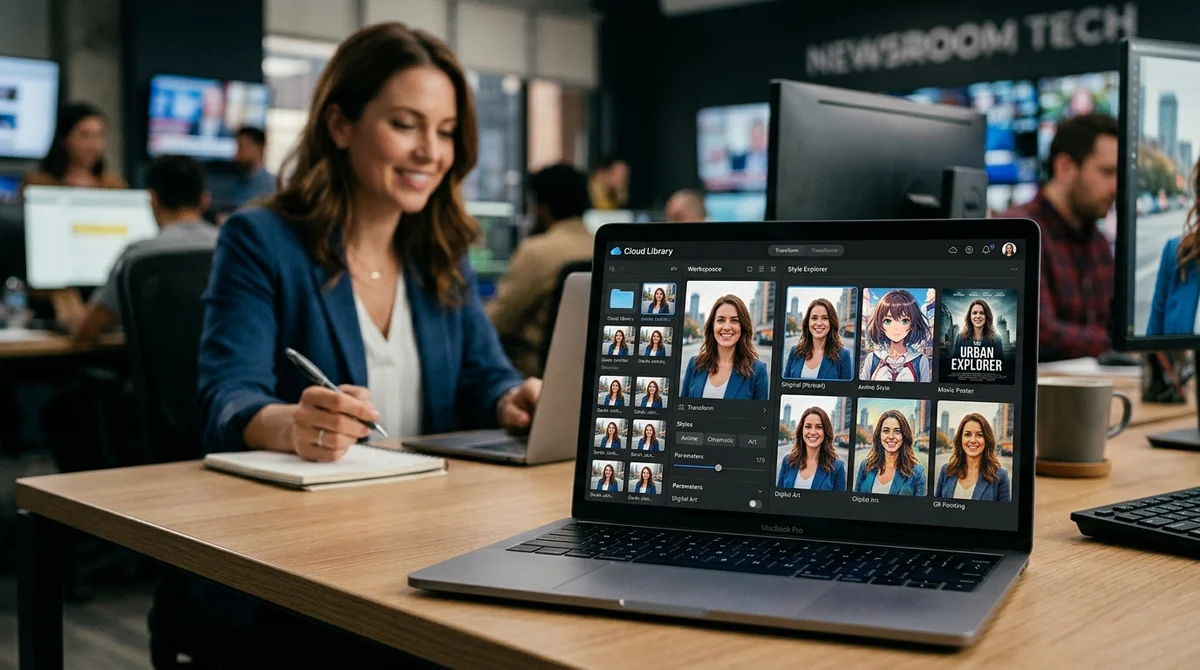
Microsoft has launched an AI Restyle tool in OneDrive that changes the visual style of photographs using AI. A user can turn an ordinary photo into an image in the style of anime, a poster, or other artistic processing without noticeable distortion of the original scene.
Why Not Copilot
The title of the news is deliberately emphatic: this is not about Copilot and not about a chat interface, but about a feature right inside OneDrive. This is an important signal about how Microsoft packages generative capabilities: not only as a universal assistant, but also as a narrow tool for a specific scenario. In this case, the scenario is extremely clear—take an existing photograph and quickly give it a new artistic look without lengthy manual retouching and without switching between multiple applications.
For OneDrive, this is a logical expansion of the role of cloud storage. The service has long ceased to be just a folder for files: users expect that a photo can not only be saved and forwarded, but also immediately prepared for publication, presentation, or personal archival. AI Restyle fills exactly this gap between storage and editing.
If the feature works reliably, Microsoft gains another argument for why it's more convenient to keep photos in its ecosystem rather than uploading them to external services.
How the Photo Changes
Judging by the description, AI Restyle bets not on a complete redrawing of the frame, but on a careful change in visual presentation. This is an important distinction: the user needs not a random new image, but the same photograph, only in a different style. This is precisely why Microsoft specifically emphasizes the absence of distortions.
For a mass scenario, this is critical, because people react sensitively when AI breaks facial features, changes body proportions, ruins the background, or loses small clothing details and objects. From the examples the company describes, it's clear that the emphasis is on familiar and easily recognizable styles: anime, movie posters, and other expressive visual templates. This is an understandable choice for a consumer product.
Users don't need to figure out complex settings or write long prompts to get a noticeable result. The faster a person sees a beautiful version of their photo, the higher the chance they'll continue experimenting, saving variants, and sharing them directly from OneDrive.
Where the Tool Comes in Handy
Potentially, AI Restyle addresses several practical tasks where an ordinary photo editor seems too complex and an image generator from scratch seems too unpredictable. Here, the user starts with a ready-made image, so the result is clearer and closer to expectations. This may be especially appealing to those who regularly design social media, collect family albums, make covers for internal documents, or simply want to quickly refresh old photos without deep editing.
- Avatars and covers for social networks
- Posters for presentations and internal materials
- Stylization of personal photos into anime or movie posters
- Quick design options without manual retouching
At the same time, the main risk with such features is always the same: the promise of "no distortions" must be confirmed by real quality on different types of photos. It's much easier to beautifully process a studio portrait than a photo with poor lighting, a complex background, multiple people in the frame, or small objects. Therefore, the success of AI Restyle will depend not only on impressive demos, but also on how predictably the tool behaves in an ordinary user's library, where photos are far from perfect.
What This Means
Microsoft continues to embed AI not only in chat assistants, but also in familiar user services where time-saving is valued over wow-factor. If AI Restyle truly knows how to change photo style without noticeable distortions, OneDrive gains a clear feature with mass demand and another way to keep users within its ecosystem instead of sending photos to external editors for manual processing or searching for new effects.
Want to stop reading about AI and start using it?
AI News is a curated feed of AI/tech news. Hamidun Academy teaches you to use AI systematically in your work.